
CASTING DIRECTORS: What is the Quick Link Activity Log and how do I use it?
This article explains the Quick Link Activity Log, a security feature that allows Casting users to track engagement with their shared links. It covers how to view the log, what specific data is collected (such as IP addresses and timestamps), and how to enable additional verification settings to capture viewer names and emails.
Accessing the Activity Log
To view the tracking details for a specific link, follow these steps:
Navigate to the specific Quick Link you have generated.
Click on the Activity Log option associated with that Quick Link.
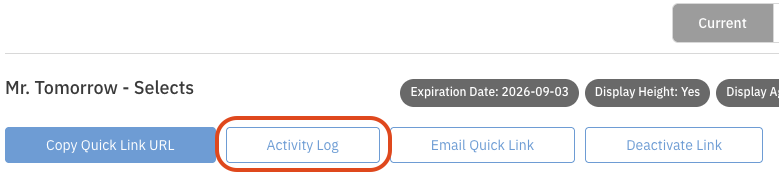
Review the user interactions, which are displayed in reverse chronological order.
Logged Information
The Activity Log displays specific details ensures sensitive content remains secure while providing a clear record of user engagement. The log includes:
IP Address: The unique internet protocol address of the user who accessed the link.
Names: The name entered by the recipient (if the "Require Name" setting is enabled).
Email Addresses: The verified email address of the recipient (if the "Require Email Verification" setting is enabled).
Timestamps: The specific times when the link was accessed and when each video was viewed.
Activity: The specific action performed, such as creating, viewing, or editing the Quick Link.
Enabling Name and Email Verification
For more detailed insights, you can configure your Quick Link to require viewers to provide their information before accessing the content. This captures the viewer's name and verified email address alongside their IP address.
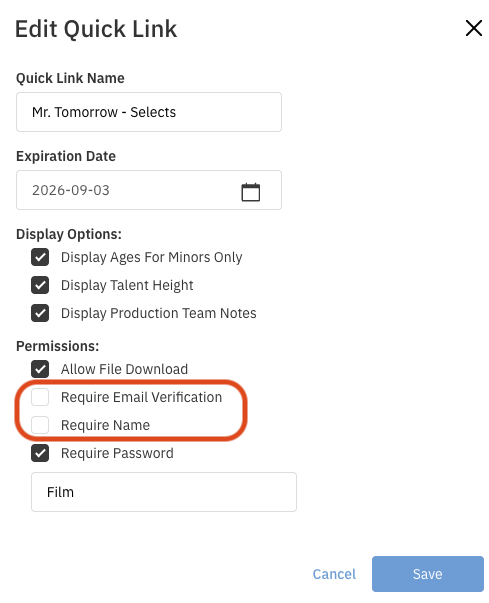
Go to your Quick Link and click the Edit button on the right-hand side.
Check the box next to Require Email Verification or Require Name (you can also select both).
Logged Actions and Privacy
Logged Actions
The system captures a range of actions to give you a complete picture of how your link is being managed and viewed:
Creation of Quick Links and addition of videos.
Opening of Quick Links.
Viewing, downloading, adding, and removing videos.
Edits to Quick Link settings.
Quick Links sent via email.
Privacy Notices
The Quick Link Activity Log is designed to respect user privacy:
A Privacy Notice dialog box informs viewers that their IP address will be collected.
All recipients of a Quick Link receive a notice regarding confidentiality.