
CASTING DIRECTOR: How Do I Integrate Fast Capture With Cast It Systems?
This article provides a step-by-step guide for Casting Directors on how to properly log in and integrate Fast Capture with Cast It Systems. By following these steps, you will ensure your projects and talent searches are synced correctly across both platforms, allowing for a smoother uploading process.
What are the requirements for integration?
Before you get started, please keep the following details in mind to ensure a successful setup:
You must have an active Casting Networks Casting Account.
It is vital that you use the exact same email address for both your Cast It Systems and Casting Networks accounts.
The project and its roles must be built on Casting Networks before you use Fast Capture.
The project does not need to be active, and roles can be set to internal.
You only need to build the specific roles that you intend to use with Fast Capture for uploading.
How do I set up the integration preferences?
Setting up the integration is a quick process handled within the application settings. Follow these steps to configure your talent search and uploading destinations:
Login to Fast Capture.
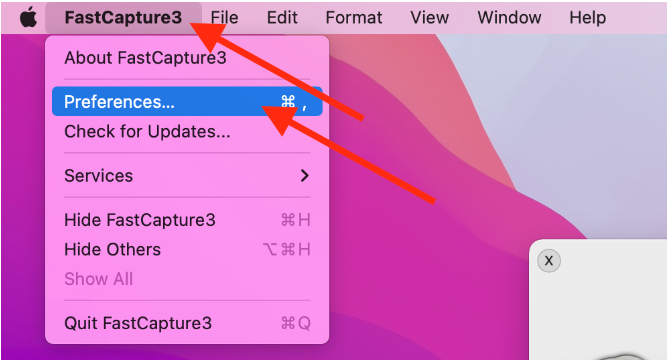
Click on FastCapture3 in the top menu bar and select Preferences.
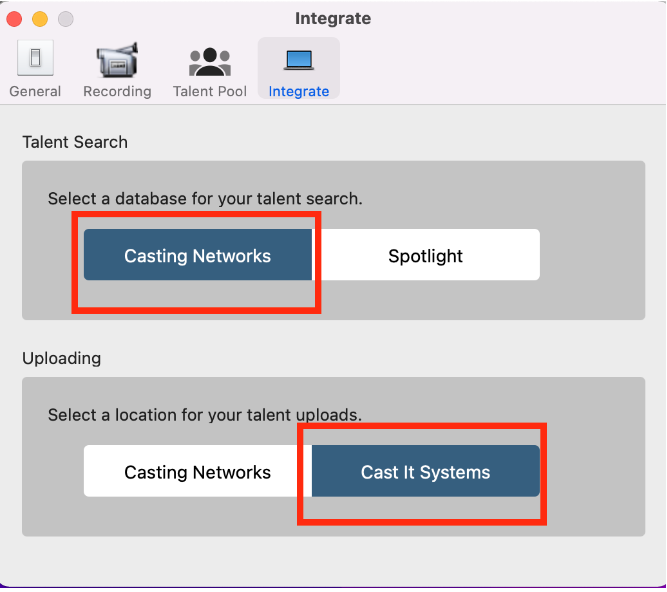
Select the Integrate tab.
In the Talent Search dropdown, select Casting Networks.
In the Uploading dropdown, select Cast It Systems.
Select the Restart FastCapture option in the pop-up window to apply these changes.
How do I log in and connect my accounts?
Once the preferences are set, you will need to sign into both accounts within the application to link them.
Select Create a new FastCapture file.
Login using your Casting Networks credentials.
Login using your Cast It Systems credentials.
Password Note
Please be aware that your Cast It Systems and Casting Networks passwords may be different. Casting Networks requires a special character, while Cast It Systems does not allow them.
FAQ’s
Do I need to make my project public on Casting Networks to use Fast Capture?
No, the project does not have to be active. You can keep your roles internal while still using them for integration purposes.
Why are my login credentials not working for both?
Double-check that you are using the same email address for both accounts. Also, remember that password requirements differ between the two systems, so your passwords may not be identical.